
WordPress Without 3rd Party ‘Amps’ Installation – No MAMP, No AMPPS, No XAMPP, etc.

When my Mac Pro server’s HD crashed  – and messed up my Movable Type database in the process – in 2012, I decided to get myself a backup server and that it was also time to take a closer look at WordPress and their claim to the famous “5-Minute Installation.”

WordPress, Movable Type (then owned by TypePad), Drupal, Blogger & others were at the forefront of the ‘blogging boom’ of the early 2000s. Virtually all were very hard to install & configure on either the PC or Mac platform. I had my luck with Movable Type in mid-2004.

I had been running Movable Type side-by-side on my main website (Kupitero’s Keep) on my web servers until my Mac Pro crashed in mid-2012 — which prevented me from putting up new blog posts since the database was messed-up real bad.

English: The logo of the blogging software Wor...
English: The logo of the blogging software WordPress. Deutsch: WordPress Logo 中文: WordPress Logo (Photo credit: Wikipedia)

So on my shiny-new Mac Mini (with Intel’s quad-core Core i7 processor & 1TB HDD), I loaded Apple’s new OS,  ‘Mavericks’ (aka 10.9.x). Note that this is just the standard version of Mavericks and not the server version for which Apple wanted me to shell out another $20 via their very lucrative App Store.

I decided to pass on the server edition &  bought some all-meat Round Table pizza instead to keep me nourished for the hours of coding ahead. I had already enriched Steve and his cronies since he was still alive, and the reviews for the server version were not so good,

In the standard version of OS X 10.9.x (Mavericks), some of the tools to run your web server and blog are still there:  Apache (the HTTP server), PHP (the scripting language) & FTP (the file transfer protocol). Although in Mavericks, Apple removed the way Apache & FTP were turned on/off easily via the System Preferences (under Sharing).

You can turn Apache & FTP on/off using the Terminal. This utility has been in Macs since 1984 to access some of the hidden features of the operating system).

To turn on Apache & FTP, respectively, via the Terminal, issue these commands (after you see the yourcomputername:~ yourusername$ prompt and take note that it might ask you for your password before it executes the command :

sudo apachectl start

sudo -s launchctl load -w /System/Library/LaunchDaemons/ftp.plist

Those commands will enable Apache (to host your web server) and load FTP to allow the file transfer server in Mavericks.

To run WordPress – as was with Movable Type – under Mavericks (OS X 10.9.x),  you will also need to enable PHP and install MySQL, the popular open-source database.

PHP is already installed in Mavericks, although you must enable it by uncommenting a line in the httpd.conf file. To do this, launch Terminal again and type the command below at the prompt. Please note that it might ask you for your password.

sudo nano /etc/apache2/httpd.conf

Once in the file, use the keys “control” + “W” to search for ‘php,’ and this will lead you directly to the line and uncomment by removing the # before the line:

LoadModule php5_module libexec/apache2/libphp5.so

Make sure to ‘Write Out’ (control + o) & save (just press return) & exit (control + x) from the file.  Then restart Apache once again for the change to load:

sudo apachectl restart

Now that most of the requirements included in Mavericks are all in place, we need to download and install the MySQL database (use the Mac OS X ver. 10.7 (x86, -64-bit), DMG Archive – this is MySQL version 5.6.15) at:

http://dev.mysql.com/downloads/mysql

OK, I’ll end the ‘requirements portion’ of this post and explain the reasons why I decided not to use any third-party application like MAMP (or MAMP Pro), AMMPS, XAMPP, Bitnami, or whatever are available out there if you would like to install WordPress on your Mac.

The main reason:  These 3rd-party apps are helpful only if you have the WordPress blog as your only website on your personal Mac web server, whether at home, school, or location of choice.

What if, just like me, you would like to have your main website developed using another application like Sandvox, Goldfish, RapidWeaver, or iWeb? And, have a separate installation of the latest version of WordPress (v 3.8) to complement your main website on the same Mac web server?

I found out that using the 3rd-party apps made it harder for me to work around the default or alternative port settings and the location of the files for my main website and WordPress. 

For example, when I was trying out XAMPP,  the choices for locating your ‘Websites’ were either:

/Applications/XAMPP/htdocs/

You can access it at http://localhost/

or,

Put your Websites in the Sites folder in your Home folder

And you can access it at http://localhost/~yourusername/

Sadly, in Mavericks, Apple removed the Sites folder when you go to the Home folder. So you will need to create this Site folder & give root permission.

And I have been so used to placing my main website files since OS X 10.0.x (aka Cheetah) in this location:

/Library/Webserver/Documents

When I tried out MAMP,  the main issue I encountered concerned the Ports needed for Apache & MySQL (defaults are 80 & 3306, respectively, while MAMP put them at 8888 & 8889, respectively).

I had a hard time sorting their instructions out when I was trying to install & operate,  essentially,  two websites (my primary website and WordPress for my blogs)  on the same web server.

I tried AMPPS, too. But, just the same, the seemingly ease of use of the application drove me nuts when I was trying to figure out the ports setting & files location within AMPPS, my Mac mini & well, yes, also my router.

So, in the end, I resorted to the basic knowledge I had when I started using Power Macs to host my website and blogs on my web server in 2004.

It took me about two days, lots of coffee, soup, ice cream, and patience to get both the main website & WordPress blogs hosted in the Mac mini.

The Mac Pro Dual Quad Server Crash of 2012

English: Backside of a Power Mac G5 (left) and...
English: Backside of a Power Mac G5 (left) and a Mac Pro (right) (Photo credit: Wikipedia)

We were out when the crash happened.

There was a brief power outage in our area while we’re away & saw the usual signs:  flashing timer lights in our oven, audio amplifier, coffee maker and the Mac Pro server was off.

The Power Macs had been hosting my website since 2004 as well as a Movable Type blog that I included in my “Kupitero’s Keep website (as an ‘offsite page’) in late 2004 (I started with MT version 3.121) .

I started hosting my website in 2004 using a Power Mac G4 (with OS X 10.3.x aka Panther) and upgraded to a Power Mac G5 (running OS X 10.5.x aka Leopard) in late 2006.

After I had saved enough money, in January 2010, I upgraded to a MacPro Dual Quad since the latest incarnation of OS X during those days – yes, until today – only supported Intel processors.  And, that was the server I was using when the power outage happened.

I powered the server back on – no problems with the hardware – but the OS just won’t load. Uh-oh, here comes the hard part.

I worked frantically the rest of the day & managed to load the OS from the Time Machine backup I had.  Great.

Everything seemed back to normal until I tried to make a new blog post in  Movable Type that fateful day in 2012.  There were errors here and there.  The Movable Type installation was busted and the related MySQL database & PHP scripts were all messed up.

I was able to restore the database and the Movable Type installation several weeks later but there was still a minor problem with one plug-in: Image::Magick.

And, that was the day I decided to do the following:

  • Buy a UPS (uninterruptible power supply)
  • Have a backup for the server – I got a Mac Mini (quad-core Intel Core i7)
  • Move my blog from Movable Type to WordPress
  • Revamp my website so that it will be more accessible to the latest and greatest browsers found on phones, tablets, and computers.

I accomplished all these until early December of this year with the exception of the 3rd one on the list above: porting my blog from MT to WordPress.

And, that will be my topic for my next post.

How to Insert Images in Movable Type 4.xx – The Easy Way

On Valentine’s Day of 2010, immediately after I ported my blogs from Movable Type v. 3.38 to v. 4.33, I made an entry that documented my key observations during the entire transition process.

Although optional – but it will make your main blog page livelier – one of the most difficult tasks was how to insert an image on the main style sheet.

I even wrote on that very same blog that I will try to make another entry on how I managed to do it.

Well, life goes on and people forget but here it is anyway.

However, after looking back at the entire process, it was really simple.

The simplicity was emphasized after I re-coded my main website to render it in the HTML5/CSS3 version.

So, here’s how I did it (note: your MT blog must be up & running already) on my MT 4.xx blog site, so just change the URL, the image size, position & alignment on your own blogs:

—-start tutorial—-

  • On the server hosting your MT blogs, go to–>mt-static–>support–>themes folder.
  • Depending on your blog theme, you will see the folder of the one you used.  In my case, it was minimalist-light-green
  • Open that theme folder and you find the exact .css file that you’re using.  Again, mine was minimalist-light-green.css.
  • Open that .css file, go to the /* Header————————-*/ section and add these lines:

#header-content {

width: 925px;

margin: 25 px 50px 26px 15px;

background: url (“enter your website link here“) no-repeat bottom right;

padding-right: 1px

padding-left: 0 px

}

—-end tutorial—-

Note that the key entry line is the background: url since it is where your image is to be looked-up by your main style sheet.

That was easy, wasn’t it?

The hard part in Movable Type is just in what folder where to look for the right .css file to insert and edit your image since there are so many files and folders after the installation of the software.

Hope this helps all MT users who like to put up an image within the style sheet !!!

An Obsession: To Fly a Collective Pitch R/C Helicopter – in 3D

On February 9 of this year, I bought a remote-controlled micro helicopter, the Syma 107G,  for $17 at a discount store near our house in one of the cities comprising the East Bay of California.

I had so much fun flying this 7-1/4 inch long toy which I had mastered in just a few minutes.  And this was when my obsession began.  I ventured into aerodynamics, physics, chemistry, and microelectronics.  And countless Google searches.

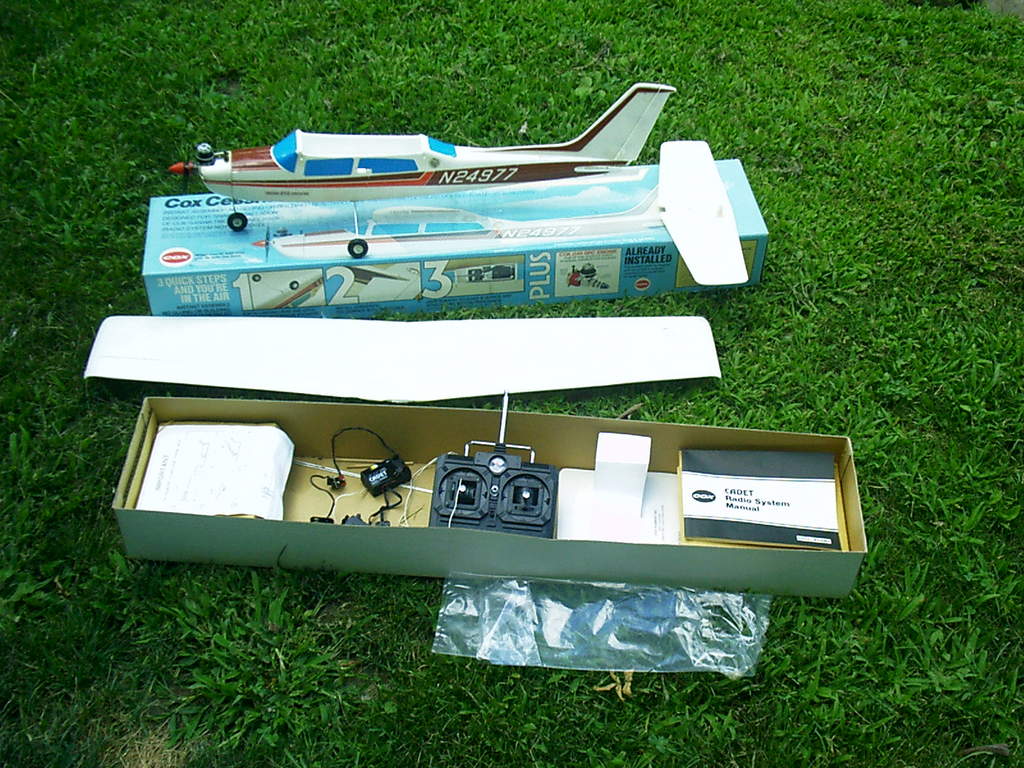
To start with, I had a brief fling with R/C back in 1982 when I was a contract worker in Riyadh, Saudi Arabia.  To kill my boredom, I bought the glow-powered Cox Cessna Centurion set, the radio system (made by Sanwa of Japan for Cox), and the maintenance kit, all for about $300.

Prior experience in my goal to fly a collective pitch R/C heli
Cox Cessna R/C trainer kit

I had memorable days flying this molded-foam glider (powered by the Cox 0.049 ORC engine)  in the deserts of Saudi Arabia, especially when the wind was almost at a stand-still during the hottest months.

Fast-forward to 2004.  The guy I purchased an Apple PowerMac G4 from somewhere in Lodi, CA, just gave me all his truck R/C stuff, including all accessories & transmitters – – for free!

As a concession to his generous gesture, I bought his still-in-the-box HobbyZone Firebird Commander ready-to-fly (RTF) R/C plane for $30.  He informed me that he only flew it once and crash-landed without damage.  The set also included a brand-new, molded-foam wing – as spare – for this beginner’s R/C glider.

I played with the R/C truck – powered by a ROAR-approved, 4000Kv brushless motor that ran on Dyna-Sport 1700 mAh NiCd batteries – for a few days with my niece and just got bored with a land-based R/C afterward.

The beauty of R/C airplanes & helis – let alone flying a kite – as a hobby is that it seems you’re also trying to control your destiny.  Nothing can compare to the feeling you get when you have that plane or heli up in the air and that you’re now using your skills to command it to the direction you want it to go.  It’s simply exhilarating!

After getting my feet wet again in R/C with the Syma 107G heli, I bought E-Flite’s RTF Blade 450 3D.   The set came with Spektrum’s DX6i transmitter  –  a popular 2.4GHz, 6-channel programmable radio.  It is  compatible with newer R/Cs using six (6) channels or less) – with the glorious thought that I could quickly fly it outside my backyard.

I was wrong; that was lesson #1:  The Syma 107G is co-axial while the Blade 450 is a collective pitch helicopter.

A collective pitch heli has a single set (if you consider a pair of blades to make one straight helicopter blade) of non-curved rotor blades.  Changing the blades’ angles by tilting them along the longitudinal axis lifts the heli.  Hence, the altitude is governed by how much pitch you apply to the rotor blades while in flight.

A co-axial helicopter is the easiest to fly since it has two sets of rotor blades that spin in opposing directions.  Hence, the torque generated by the spinning blades cancels each other out, resulting in a very stable helicopter.

But, all this type of heli can do is hover up & down, move forward & backward, and forward flight is generally on lower altitudes.  You can’t bank the heli as it makes a turn.

My attempts – both inside & outside the house to hover my Blade 450 3D a few feet in the air resulted in costly trips to several hobby stores – to replace damaged rotor blades, main gear, and just about all the small parts above the swashplate.

Frustrated and humbled, I Googled to find out what would be the easiest way to fly a collective pitch heli without having to learn the technical details – I just wanted to get one up in the air & control it!

I was so wrong again, and this was my lesson #2:  You can’t learn to fly a collective pitch R/C helis unless you’re willing to learn & understand the underlying science and art of the hobby.

During my continuing education, I also purchased John Salt’s e-book “Setup & Tips For Electric Collective Pitch RC Helicopters.”  I tried as best I could to understand all the new terminologies and jargon in this now getting-to-be-complex-and-expensive hobby.

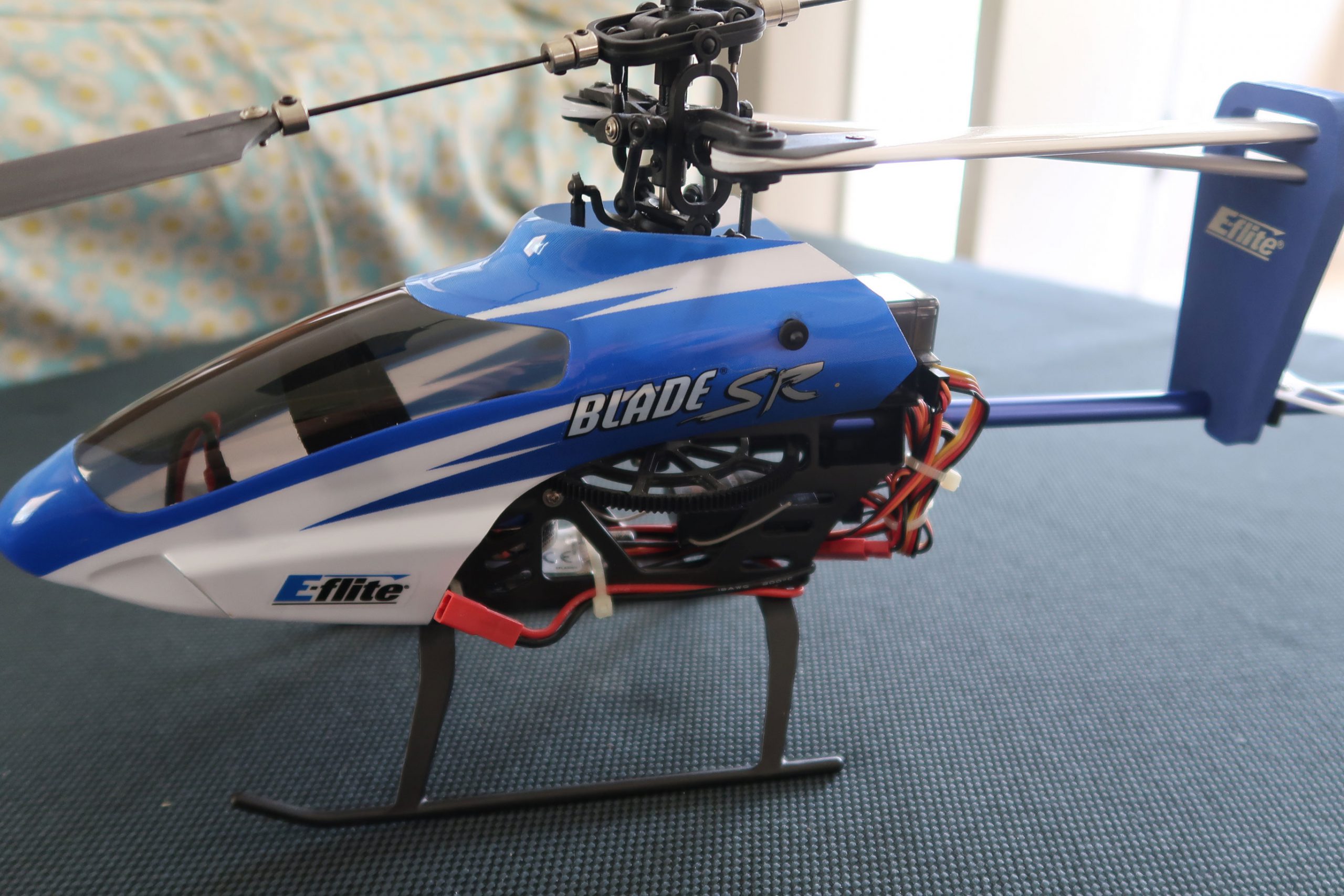
So on February 23, I purchased the E-Flite Blade SR (RTF) – there is no BNF (Bind and Fly) version – plus an assortment of extra parts at a HobbyTown branch in Vacaville.

Learning from my Blade 450-3D fiasco, I also ordered the Phoenix RC Flight Simulator V3 from Amazon to hone my flying skills on a computer screen before I even attempted to hover the new Blade SR.

Popular among beginners looking for their maiden CP helicopter flight - the Blade SR seems to be the right size
E-Flite’s Blade SR

Wrong again, and that was lesson #3:  A simulator can help you learn how to control your transmitter and pilot your model heli.  But, in the real world, no flight simulator can genuinely recreate the environment you’re flying your model R/C.

And so, just as I had with the Blade 450, my dream of simply hovering a collective pitch with my new Blade SR (which E-Flite touted as “the heli to make your transition to a collective pitch as smooth as possible“) ended with “shattered results” also.

I broke the wooden 325 mm rotor blades, bell mixer & pushrods and almost broke my right middle finger when I tried to stop the erratic heli while spooling it up.

Back to the drawing board, I assumed I was trying to fly a big-sized CP heli too fast.

So, why not try a small collective pitch heli – so I can even try practicing with it inside the comforts of the house?

And so, on March 3, I went to a discount hobby shop – Low Price Hobbies – in Newark, CA, and purchased the E-Flite Blade mCP X2 (BNF version), plus an assortment of spares for the Blade SR.

I also bought an aluminum case for my Blade 450 3D.  I knew it would take some time to fly this bird, so I wanted it protected from the elements.

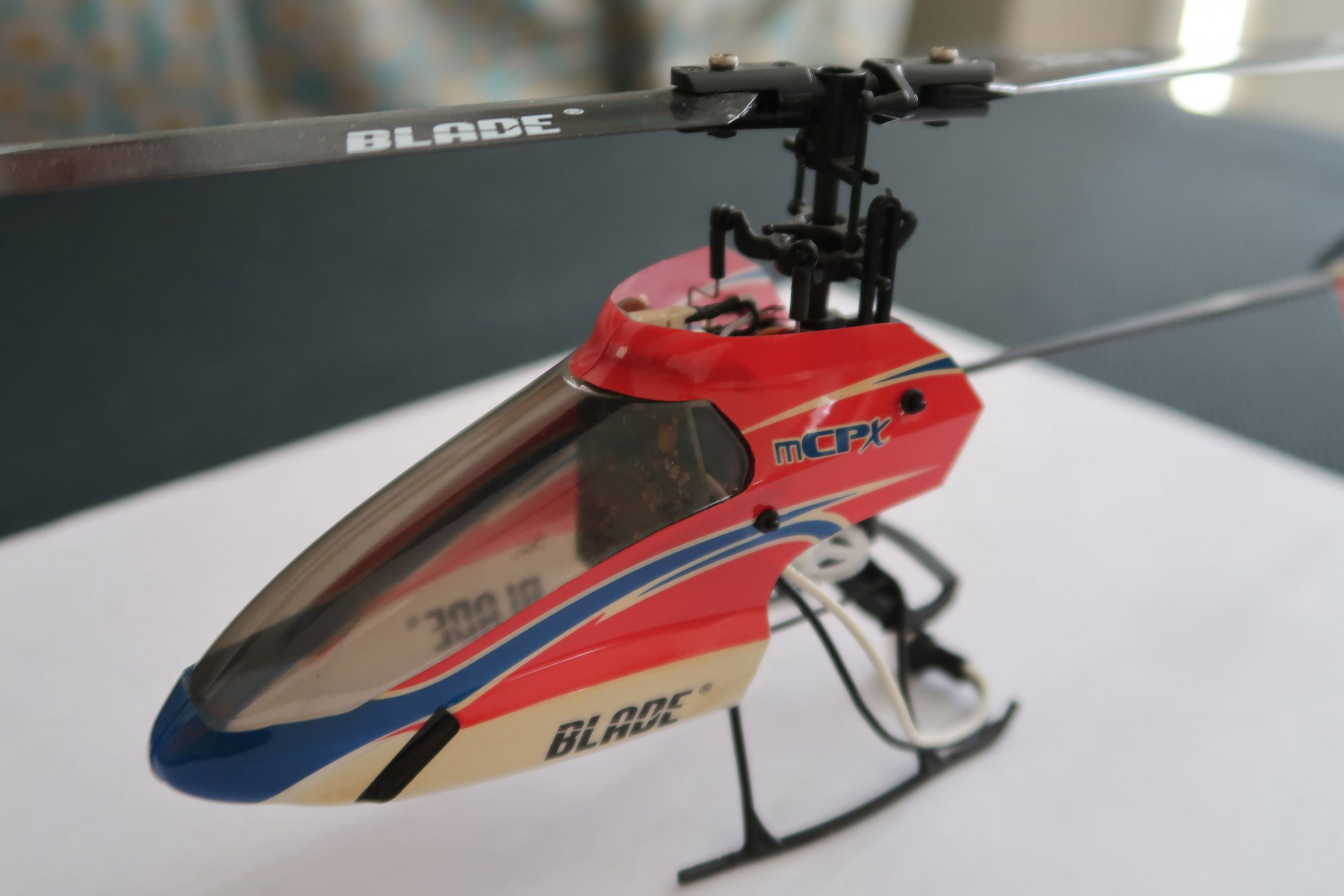
The Blade mCP X2 is a small collective pitch heli that measures about 9.5 inches in length.  It is also flybarless, so it only weighs about 46 grams.

The small Blade mCP X2 looks like a good candidate to finally hover a collective pitch R/C heli
Another R/C heli in the collection – — Blade mCP X2

A typical collective pitch heli comes with a mix of the Bell & Hiller rotor heads, which has a flybar.  It is oriented 90-degree to the main rotors.   The flybar helps stabilize the heli by changing the pitch angles of the main rotors in gusty wind conditions.

By removing the flybar and placing all the servos in a single system board,  E-Flite made the mCP X2 very light.

And so, was I successful in, at least, hovering this ultra-micro collective pitch heli?

Yes, I was, but the duration of all my attempts never even lasted a full minute.

It takes a finely tuned transmitter –pitch & throttle curve and all other crucial transmitter settings – plus a very steady hand to deftly guide a CP heli.

Notes on the Blackberry Playbook

What separates the Blackberry PlayBook from Apple’s iPad and other Android-based tablets?

The answer lies in the operating system.

The PlayBook runs on QNX which is a true micro kernel operating system.

Apple’s iPad runs on iOS which was derived from its core Mac OS X.  OS X was basically Darwin – an open-source, POSIX-compliant OS which was derived from the Steve Job’s founded NEXTStep OS (which Apple bought in 1997), BSD and other free software projects.  These are mostly UNIX-based derivatives.

Google’s Android is basically Linux – another UNIX variant – plus a lot of free-Java implemented codes.  Google basically patched-up the Android OS which they bought in 2005.

It’s interesting to note that UNIX, as well as most of Microsoft’s OSes like Windows, NT as well as the OS/2, have huge core OS codes.  And this is what slows them down.

Hardware makers tried to compensate for these monolithic OSes by using faster processors.

However, faster processors had been a bane on the battery life of these portable devices.

Remember the battery issue with Apple’s iPhone 4GS?  Apple issued a software patch.

The QNX OS on Blackberry PlayBook is what makes the device run so fast compared to the iPad and any other Android-based tablet.

QNX is a true micro kernel implementation of an operating system.  It’s so ideal for embedded platforms.

QNX is not new either.  It has been around since the early 80s.  The last gadget I had messed with that runs on QNX was the very ambitious Netpliance device released in 1999.  See post on my old version of my web site here.

Given that all hardware components inside the guts most tablets are sourced from the same suppliers. And, given that some designs may be better than others, it’s always the OS that run the hardware that makes the most magic.

And so, I thought my 16GB Blackberry PlayBook – which I had scored for $199 during their November 2011 sale – will be relegated to the junk bin in my closet after only a few weeks of use.

I was wrong.

No, no, no.  Hands down, it’s way much better than Apple’s iPad or any other Android-based tablet out there in the market today.

Now, I intend to get a second one – the 32GB this time while it’s still on sale.

And, I’ll say it again.

Some companies, no matter how good their products are, don’t always serve the best interest of their customers.

A Tribute to Cesaria Evora

Cesaria Evora tribute: Cover of "Voz D'Amor"
Cover of Voz D’Amor

Cape Verdean  –Cape Verde is a string of islands off the coastline of West Africa and a former Portuguese colony– songstress, Cesaria Evora passed away last Dec 18, 2011.

Since most of her songs were rendered in Portuguese, I thought – when I first heard her music -that she was Brasilian. My mistake only proved, once more, the universality of music as a medium.

Most of my late afternoon to early evening music listening hours were punctuated by her songs which seem to always have a sense of longing for something we can’t have in this materialistic world we, unfortunately, live in.

At least, for me, she was the female counterpart of Milton Nascimento.

My deep respect goes to all world music persona who always seem to find a way to soothe away the pains and worries of plain mortals like us…of the difficulties of living in this world.

One of my favorite songs is “Crepuscular Solidao” which is literally translated in English as ” solitude in twilight”.

And the last few lines of the track goes something like….

“There are people, too many people
Who suffer from loneliness
There are people, too many people
Who are almost dying, by the fading twilight
By the fading twilight, by the fading twilight”

Rest now, our dearest barefoot diva…Cesaria Evora.

Black Friday Version 2.0.11

I had to get home early after our Thanksgiving party in Fremont so that I can get to bed early.

By 10:00 pm, after watching a streaming video – “Bride Flight” – via Netflix, I dozed-off and dreamed about the gadgets I planned to buy for this year’s Black Friday sale, version 2.011.

On top of my list was Roku’s HD-XS video streaming pod.  The only other gizmo on my list was Blackberry’s Playbook tablet.

Roku 2 XS box
Roku 2 XS box (Photo credit: rushaw)

These two were by painstakingly culled from the numerous gadgets that were playing tricks on my head as Nov. 25 slowly crept in. My reasons were as follows:

For the Roku HD-XS, I plan to give it as a Christmas present.  Two BFs ago, they had a similar sale for their then, top-of-the-line, Roku HD-XR at half ($65) their selling price of $130.

The choice of the Blackberry Playbook was one that was arrived at after days of careful research and thoughtful considerations.

Did I get both?

And so, my biological clock roused me up at 5:30 am. Made and poured me 3 cupfuls of coffee unto my thermos and by 5:50 am, I was already at the front door of the nearest Office Depot store.

At the door, the sales person handed me a piece of paper which served as my ticket to get my Blackberry Playbook 16GB at the limited-time offer price of $200.

Blackberry originally sold their 16GB version of the Playbook for $500. After Amazon began shipping their “Fire” tablet last Nov 15 for $200, Blackberry joined the tablet price-cut fray by offering their Playbooks $300 less out of your wallets.  This offer is good until Dec. 3, 2011 only.

But, I want my Playbook now and so after taxes ($17.50) & the CA recycling fee ($6), my new BF toy set me back at $223.50.

By 6:45 am, I was already back at home.

Got another cup of coffee & checked out Roku’s website.

There was a Roku HD-XS deal but it was not the similar deal they had back in 2009.

You have to buy two HD-XS boxes just to get a $40 discount.

And – this was the part that really turned me off –  you have to kiss their ass via Facebook.

Facebook????  Yucks.

11-11-11

November 11
English: President Woodrow Wilson addresses the United States Congress early in his first term. (Photo credit: Wikipedia)

A once-in-a-lifetime occurrence, 11/11/2011 had been deemed by the Chinese as the luckiest day to get married.  For them, it’s the best day to leave the single life behind.

In the U.S., 11/11 is Veteran’s Day – a national holiday.  It was President Woodrow   Wilson who proclaimed this holiday on November 12, 1919 to celebrate the signing of the Armistice that ended World War I.

It’s merely coincidental that holiday is on its 92nd year of celebration in 2011.  The sum of 9 and 2 also yields 11.

For this author, 11/11/11 is the luckiest day in his lifetime.  He gets all the 11s and a 6.

This author salutes all the war veterans – as well as all the newly weds – on this special, once-in-a-lifetime date!!!

October 5, 2011 – Steve Jobs Goes Beyond

My early adulthood years hero is dead.

English: Apple IIe computer (enhanced version)
English: Apple IIe computer (enhanced version) (Photo credit: Wikipedia)

Since I had my first Apple II back in 1980, I had looked-up to Steve as my idol.  He was brash, handsome and had that unmistakable air of invincibility in him.

I was working in the Kingdom of Saudi Arabia in 1982 when I first saw the fantastic Apple IIe – as well as the Apple III.

I don’t believe in miracles and magic but I had an epiphany when I laid my eyes on the Apple IIe inside that store in Saudi Arabia.  It seemed to have a halo above it — the company has something special going for it.

What followed for Apple from 1982 through nearly the end of 2011 could probably never be repeated again in world business history.

The world’s best salesman and magician had died.

Thanks, Steve, for all those goodies

Will The Clouds Go Down the Amazon?

Kindle Fire: Out of the Box
Kindle Fire: Out of the Box (Photo credit: Brian Sawyer)

You have to admire the spunk of Jeff Bezos (CEO, Amazon.com).

Today, after the release of Amazon’s tablet, ‘Fire‘, he fired the opening salvo towards the heavily-fortified Apple castle with this quotable quote: ” There are two types of companies: those that work hard to charge customers more, and those that work hard to charge customers less. Both approaches can work. We are firmly in the second camp.”

While it’s true that both companies ran perpendicular business models, the short-term future may see these two pioneering firms seeing eye-to-eye, toe-to-toe in the fast-evolving, streaming multimedia market.

Yep, Apple creates very elegant products that command premium prices.  On the other hand, Amazon was only an accidental player in the cut-throat tech hardware market.  Their only hit hardware product was the Kindle.  And, they had no choice but to come up with it to augment their status as the number one digital book purveyor.

Recession-friendly priced at $199, middle-class Americans – who are already credit-pinched- will take a long hard look at Amazon’s Fire tablet before casting their fate to Apple’s uber-popular iPad.

If they feel the Fire didn’t scrimp on quality to achieve that $199 price tag, they might forego altogether that burning desire to get Apple’s iPad (which this author still believes, is really an over-sized, over-priced version of the iPod Touch…ho-hum, really nothing new in here except a lot of advertising superlatives).

After all, gadgets will still be gadgets while the $300 price discrepancy can feed a lot of homeless folks in the San Francisco Bay Area.

Only time, – and, maybe, apps – can tell if this Fire created by Amazon will be strong enough to generate the right amount of rain clouds to douse the scorching heat generated by  Apple.